
Deposit and Withdraw

Introduction
1ee relies heavily on local wallet payments, so knowing how deposits and withdrawals actually work matters just as much as knowing the games themselves. Many users run into delays not because the app is broken, but because a step gets skipped or a detail doesn’t match what’s on file. This guide walks through both processes in a clear, practical order, along with the checks worth doing before any money moves.
Payment issues are also where most support tickets come from in this category of app. Getting the basics right the first time — correct account details, the right minimum amount, and patience during review — avoids most of the common headaches.
What Is the Wallet System in 1ee Game?
Inside the app, a dedicated Wallet tab handles all money movement, separate from the games themselves. It connects to local payment rails such as JazzCash and Easypaisa, with bank transfer sometimes available as an additional option. Every deposit and withdraw process passes through this same tab, so it’s the first place to check whenever a transaction needs attention.
Why verification matters: because 1ee Game is distributed as an APK rather than through the Play Store, wallet providers may scrutinize transfers to it more closely than they would for a mainstream app. Keeping 1ee register details accurate reduces the chance of a flagged or delayed transaction.
How to Make a Deposit
Deposits are usually the faster of the two processes, since they don’t require the same review as a withdrawal.
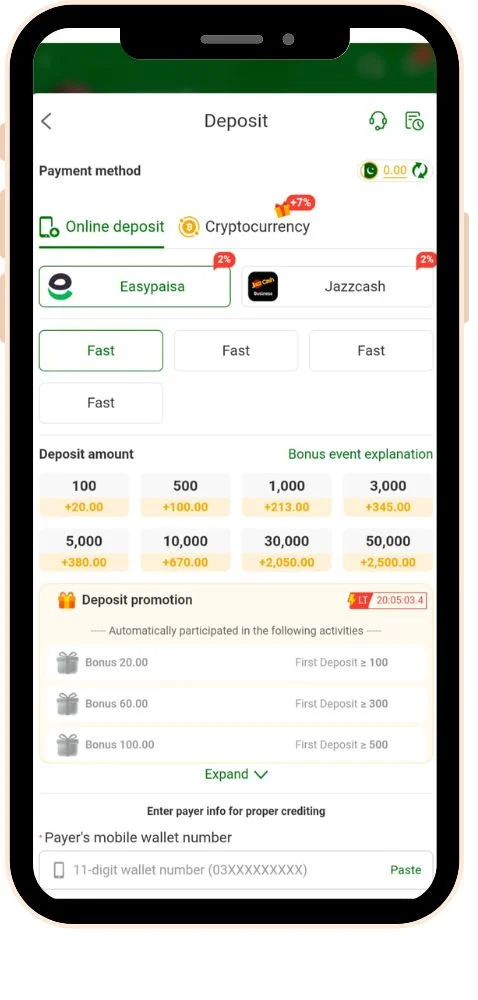
- Open the Wallet tab and select Deposit.
- Choose a payment method — JazzCash, Easypaisa, or bank transfer, depending on what’s listed.
- Enter an amount that meets the minimum deposit shown on screen.
- Confirm the payment details match the account you’re sending from.
- Complete the payment through the wallet app or bank prompt that opens.
- Return to 1ee Game and wait for the balance to update, saving the transaction ID in the meantime.
If a deposit doesn’t reflect: avoid sending a second payment right away. Check the transaction ID against the wallet’s own history first, then contact in-app support with that reference number ready.
How to Make a Withdrawal
Withdrawals involve more checks than deposits, mainly because of identity verification and any active bonus conditions.
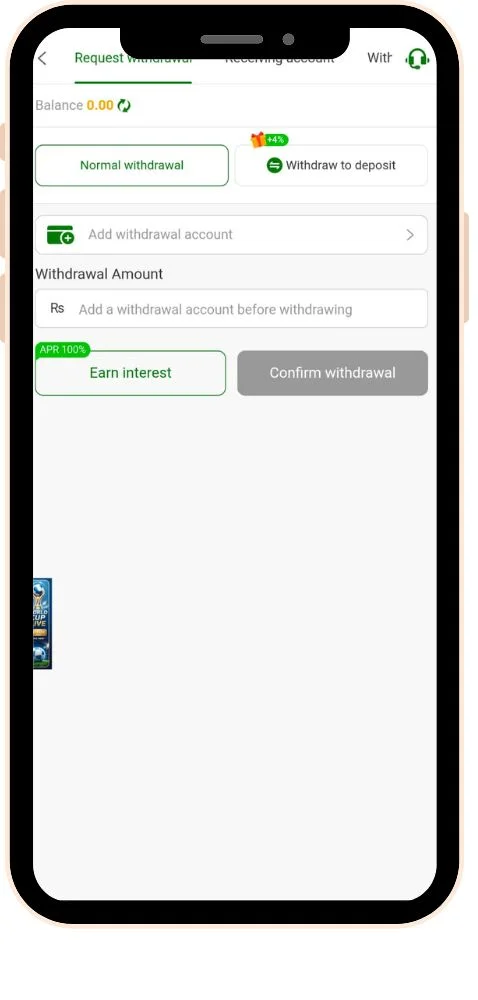
- Open the Wallet tab and select Withdraw.
- Choose the payout method — this usually needs to match the method used for depositing.
- Enter a withdrawal amount that meets the stated minimum.
- Confirm the receiving account name matches your verified registration details exactly.
- Submit the request and note the reference number provided.
- Allow time for review, since bonus wagering requirements can delay approval.
- Check the transaction status in the Wallet tab rather than submitting a repeat request.
Common holdup: a withdrawal tied to an unfinished bonus wager will usually sit pending until that requirement is met. Reviewing bonus terms before claiming one avoids this surprise later.
Deposit vs. Withdrawal at a Glance
| Detail | Deposit | Withdrawal |
| Typical speed | Often near-instant once payment clears | Can take longer due to identity and bonus checks |
| Main requirement | Matching payment details, minimum amount met | Verified account name and completed wagering, if applicable |
| Most common delay | Payment not yet reflected by the wallet provider | Pending bonus wagering requirement |
| What to save | Transaction ID from the payment | Withdrawal reference number from the app |
Tips for Trouble-Free Transactions
| Tip | Why It Helps |
| Use the same payment method for deposit and withdraw | Many platforms require this match for identity and fraud checks |
| Double-check the receiving name before submitting | A mismatch is one of the most common causes of a rejected withdrawal |
| Read bonus wagering terms before claiming an offer | Prevents funds from being locked when a withdrawal is requested |
| Keep screenshots of every transaction | Gives clear proof to support if a payment goes missing |
| Avoid submitting duplicate requests | Duplicate withdrawals or deposits can create confusion and further delays |
| Set a personal withdrawal routine, like weekly cash-outs | Keeps balances from building up and reduces the temptation to keep playing |
Conclusion
Deposit and withdraw sit at the center of the entire 1ee Game experience, and most issues in this area come down to mismatched details or unread bonus terms rather than technical faults. Confirming payment details before submitting, keeping records of every transaction, and understanding wagering requirements ahead of time make the process far smoother. When something still doesn’t add up, the in-app support chat, backed by a saved transaction ID, remains the most reliable path to a resolution.